
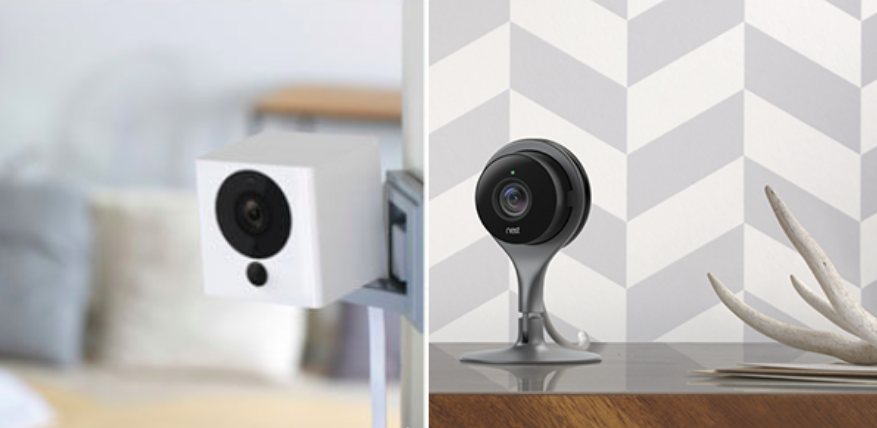
Wyze and Google Nest are both well-known names in the smart home security space, but these lines of security cameras carry very different price tags. Wyze made smart home security more accessible to many while Nest cameras are on the pricier end of the spectrum (almost 8 to 10x more than the Wyze). We compare their top-selling smart indoor cameras–the Wyze Cam and the Nest Cam Indoor–to help you decide whether to save or splurge.
Wyze Cam vs Nest Cam Indoor Comparison Chart
| Model | Wyze Cam | Nest Cam Indoor |
| Amazon product | Amazon product | |
| Price | Amazon product | Amazon product |
| Dimensions | 2.20″ x 1.97″ x 1.97″ | 4.5″ x 2.8″ |
| Max Resolution | 1080p HD at 15fps | 1080p HD at 30fps |
| Camera | 1/2.7″ CMOS Sensor | 1/3″ 3MP Sensor |
| Field of View | 110° wide angle | 130° diagonal |
| Motion Sensor | Yes | Yes |
| Custom Motion Zones | 1 | 4 (with Nest Aware subscription) |
| Motion Notifications | Yes | Yes |
| Night Vision | Yes | Yes |
| Infrared LEDs | 4 | 8 |
| Two-way Audio | Yes | Yes |
| Smart Sound Alerts | Smoke Detector Carbon Monoxide Detector | No |
| Scrollable Timelapse | No | Yes |
| Compatibility | Amazon Alexa Google Assistant IFTTT | Amazon Alexa Google Home Philips Hue IFTTT |
| Memory | 128 MB | No |
| Cooldown Period | 5 minutes | 10 minutes |
| External Storage | microSD, up to 32GB | No |
| Geofencing | No | Yes |
| Cable Length | 6 ft | 10 ft |
| Subscription Service | Free rolling 14-day cloud storage | Nest Aware Starting at 5 USD/month |
| Colors | White | Black |
Design and Installation
The Wyze Cam and the Nest Indoor Cam have very different aesthetics, but both can be mounted in different ways

Their aesthetics are so different that users with different tastes will tend to gravitate towards one over the other. The cube-shaped Wyze Cam has a white matte finish and light gray stand. While the Wyze doesn’t feel as premium as the Nest Indoor Cam, it sure does look good for its price. Contrary to the Wyze’s white boxy frame, the Nest Indoor Cam is round and its black body is more stripped down. It has a slightly better build and finish, as it should.
Both are not weatherproof and are not designed for outdoor use. They can only withstand temperatures of 32° up to 104° F ( 0° to 40° C). These smart indoor cameras can be mounted on top of shelves, on the walls, or from ceilings. Both the Wyze Cam and the Nest Indoor Cam are magnetic and come with a mounting plate. The Wyze has a 3-axis design that lets you tilt the Cam at any angle. Something to note when installing them is they both need to be plugged into a power source.
Video Quality
Both the Wyze Cam and the Nest Cam Indoor can capture 1080p videos, but the Nest can capture more frames per second and offers a wider field of view

With vastly different price tags, it is expected that the more expensive Nest Cam Indoor will offer better video quality than the budget Wyze Cam. Both the Wyze and the Nest can capture up to 1080p HD videos, but the Nest’s videos are clearer than the Wyze’s. This is because the Nest Indoor Cam has a better sensor and can shoot at up to 30fps whereas the Wyze can only do so at 15fps.
Since the Nest Cam Indoor can capture more frames per second, there’s less motion blur in its night vision videos than in the Wyze’s. The Nest’s 130° diagonal field of vision can also capture a slightly wider area than the 110° wide angle of the Wyze. Another helpful feature in the Nest Cam Indoor is you can scroll through the footage in timelapse mode, while for the Wyze, you need to set the time-lapse before it records. With that said, the Wyze’s daytime and night vision videos still deliver great quality, especially for its price.
Audio Quality
The Wyze Cam has slightly better audio than the Nest Cam Indoor

With their built-in speakers and microphones, the Wyze Cam and the Nest Cam Indoor can pick up audio and let you talk through the indoor security camera. As the more affordable device, the Wyze surprisingly records clearer audio than the Nest. Neither device offers stunning audio from their speakers, but they get the job done. While the Wyze’s speaker can go a bit louder than the Nest’s, it also tends to sound tinny and garbled.
Motion Sensor
Both the Wyze Cam and the Nest Cam Indoor have motion sensors, but their motion notifications have a slight delay

Motion detection is something that should be considered when choosing your indoor security camera. Both the Wyze Cam and the Ring Indoor Cam can detect motion and allow different motion sensitivity settings. Both smart security cameras let you set custom motion zones. You can define one motion zone for the Wyze Cam while the Nest Cam Indoor lets you set 4 zones as long as you’re subscribed to Nest Aware.
Another crucial feature of these smart indoor cameras is their motion alerts. When they detect motion, they can send you a notification so you can check the event right away. However, both the Wyze Cam and the Nest Cam Indoor send the alert with a delay of 15 to 35 seconds. Surprisingly, the Wyze sends the alert just a tad bit earlier than the Nest does. For faster motion notification alerts, you can pair the Wyze Cam with the Wyze Sense motion sensor kit.
Both the Wyze and the Nest have a cooldown period once a motion alert is sent. For the Wyze Cam, the cooldown period is 5 minutes, while it’s 10 minutes for the Nest Cam Indoor. If you’re using the Wyze’s free 14-day cloud storage, it will only record 12-second clips, so use external storage if you want to record full videos. As for the Nest, you need the Nest Aware subscription to be able to review and save the recorded footage. The Nest Aware plan starts at 5 USD/month.
Additional Features
The Wyze Cam supports external storage and sends alerts when the smoke or carbon monoxide detector goes off

An great feature of these smart indoor cameras is you don’t need to purchase a separate hub for them to work. Simply plug them, download their app, set them up with your device, and they can start monitoring your home. Both the Wyze Cam and the Nest Cam Indoor are compatible with smart assistants like Amazon Alexa or Google Assistant.
Wyze makes owning security cameras as affordable as possible by offering free 14-day cloud storage and a slot for external storage. The Wyze Cam’s microSD slot supports up to 32GB of extra storage. Another feature in the Wyze Cam that’s missing in the Nest Cam Indoor is the Smart Sound alerts. You will get a notification when the Wyze detects that your smoke or carbon monoxide detector goes off. Meanwhile, the Nest Cam Indoor boasts 24/7 recording when you’re subscribed to Nest Aware.
Verdict: Wyze Cam or Nest Cam Indoor?
The Wyze Cam’s offers incredible value for your money and wins by a mile
The Wyze Cam is a no-brainer in this comparison. For a fraction of the price of the Nest Cam Indoor, you can get similar smart security features from the Wyze Cam. Even their motion alert speed, a crucial deciding factor, is almost the same. Should you decide to get the Wyze Cam + Sense Starter Kit bundle for much faster notification speed, it is still a lot cheaper than getting the Nest Cam Indoor. In addition, Wyze doesn’t require you to be tied down to a monthly subscription just to be able to view the footage, which is the case for the Nest Cam Indoor.