
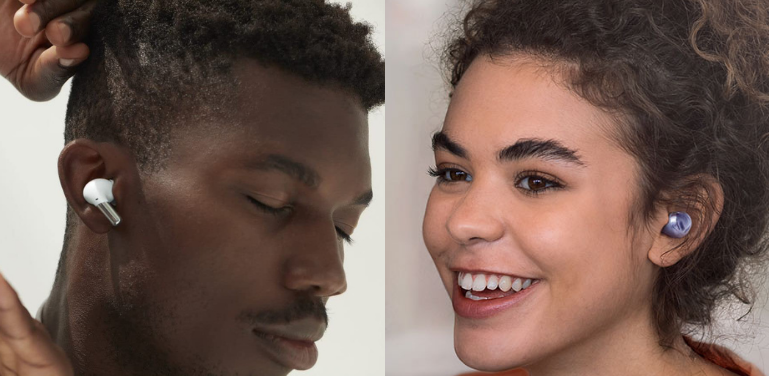
For many OnePlus smartphone owners, the OnePlus Buds Pro brings significant upgrades to the original but troublesome OnePlus Buds. Aside from addressing issues with fit and sound quality, the Buds Pro comes with active noise cancellation (ANC). It’s a move that brings OnePlus’ wireless earbuds in close comparison with its namesake — the Samsung Galaxy Buds Pro.
Samsung’s true wireless earbuds are a fixture in many recommended lists. Combining ergonomic design with staple features like ANC, it’s a device that stands on its own even against Apple’s AirPods. The OnePlus Buds Pro, however, has the edge when it comes to battery life. But is a longer playback time compelling enough to pick the Buds Pro over Samsung’s own?
OnePlus Buds Pro vs Samsung Buds Pro Comparison Chart
| Model | OnePlus Buds Pro | |
 |  | |
| Price | Check at Amazon | Check at Amazon |
| Type | Wireless in-ear | Wireless in-ear |
| Colors | Matte Black, Glossy White | Phantom Violet, Phantom Black, Phantom Silver, Phantom White |
| Earbuds Size | 32 x 23.2mm | 20.5 x 19.5 x 20.8mm |
| Charging Case Size | 60.1 x 49 x 24.9mm | 50.0 x 50.2 x 27.8mm |
| Charging Case Weight | 52 g | 44.9 g |
| Audio | 11 mm dynamic drivers | Two-way (11mm woofer & 6.5mm tweeter) |
| Durability | IP55 (earbuds), IPX4 (case) | IPX7 |
| Active Noise Cancellation (ANC) | Yes | Yes |
| Ambient/Transparency Mode | Yes | Yes |
| Included Ear-Tip Sizes | 3 | 3 |
| Connectivity | Bluetooth 5.2 | Bluetooth 5.0 |
| Battery Life | 5 hours with ANC on 7 hours with ANC off Up to 38 hours (with charging case) | 5 hours with ANC on 8 hours with ANC off Up to 28 hours (with charging case) |
| Fast Charging | Yes, Warp Charge | Yes, Quick Charging |
Design
The OnePlus Buds Pro draws inspiration from the Apple AirPods’ design, while Samsung is content keeping the Galaxy Buds Pro stemless.

When it comes to design, the OnePlus Buds Pro and Samsung Buds Pro take different routes. OnePlus doesn’t shy in taking inspiration from the Apple AirPods. However, unlike the AirPods, the stems on the Buds Pro sport a metallic finish, giving the device an almost dual-tone colorway. It’s also larger than the AirPods and weighs a bit more compared to the Galaxy Buds Pro.
Except for the Galaxy Buds Live, Samsung has stuck with the stemless form of its earbuds. On the Galaxy Buds Pro, this approach is refined a little further. Yes, there are no wingtips here. If you’re worried about fit, you still get three ear-tip sizes to choose from.
Based on reviews, however, the Samsung Buds Pro’s larger build may not be the best for small ears. Here, the Galaxy Buds 2 might be a more ergonomic albeit less premium alternative. You can get a better idea of what suits you in our best wireless earbuds review.
OnePlus and Samsung keep it simple when it comes to the case. Both use a clamshell design, with the OnePlus sporting a more rectangular form compared with Samsung’s square. They’re reasonably sized and should fit in most front pockets comfortably. Meanwhile, rounded corners lend the cases a sophisticated look.
Lastly, you can get the OnePlus Buds Pro in a matte black or glossy white colorway. Samsung’s Galaxy Buds Pro, on the other hand, comes in Phantom White, Violet, Black, and Silver.
Audio
If you want a bass-heavy sound profile, get the OnePlus Buds Pro. But if noise cancellation is something you prioritize, then you’re better off with the Samsung Buds Pro.

The OnePlus Buds Pro and
Leakage performance is also good on both wireless earbuds. Whether you’re wearing the OnePlus or Samsung Buds Pro, you don’t have to worry about others hearing what you’re listening to. If you prioritize bass, you’ll get better performance from the OnePlus Buds Pro. When it comes to mid and treble accuracy, both earbuds are comparable.
Now, the OnePlus uses three ENC microphones for noise isolation. On the other hand, the Galaxy Buds Pro is equipped with microphones inside and outside the buds to monitor noise in real-time. Samsung shares that its flagship wireless earbuds can cut background noise by up to 99%. While real-life performance isn’t the same as the percentages, Samsung does have the edge here. The OnePlus Buds Pro, on the other hand, has a difficult time blocking out low and mid-range noise.
If noise canceling is a feature you need, consider these top-rated headphones instead.
Features and Controls
OnePlus uses AirPods-like pressure-sensitive stems for controls while Samsung goes for a touchpad on its Galaxy Buds Pro.

OnePlus’ Buds Pro doesn’t come with EQ presets. You can, however, tailor-fit the audio profile based on your hearing. There are also 10 signature sound profiles on the Buds Pro you can choose from. Samsung’s Galaxy Buds Pro also comes with preset EQ profiles. If you’ve paired it with a Samsung Galaxy smartphone, you can customize the EQ settings on the phone itself.
Just like in design, OnePlus borrows ideas from AirPods when it comes to controls. The Buds Pro’s stem is also pressure-sensitive — squeeze quickly to pause, pinch twice to skip songs, or hold to switch between ANC and ambient modes.
Samsung’s Buds Pro, on the other hand, uses a touchpad. Instead of pressure, light taps control playing music, skipping tracks, or answering calls. These controls are also customizable from the Wearable app. In addition, the Samsung Buds Pro has a Double-tap earbud edge toggle that allows you to tap your ears instead — handy if your fingertips are sweaty.
Connectivity and Battery Life
Both the OnePlus and Samsung wireless earbuds support seamless Bluetooth connections and boast impressive battery life.

The OnePlus Buds Pro and Samsung Buds Pro have decent Bluetooth connectivity and wireless range. Samsung uses its proprietary codec Scalable for high-quality audio streaming. On the other hand, OnePlus employs the low-latency LHD audio codec for HD streaming.
You can also pair these wireless earbuds to two different Bluetooth devices simultaneously. OnePlus calls it Dual Connection, while Samsung brands it as Seamless earbud connection. While this isn’t true multi-point connectivity, it does allow the earbuds to automatically switch to the device where audio is playing.
Battery life is tricky when it comes to the two. With ANC turned on, both the OnePlus Buds Pro and Samsung Buds Pro deliver 5 hours of playtime. Turn the ANC off, and you get 8 hours on the Samsung Buds Pro and 7 hours on the OnePlus Buds Pro. For calls, Samsung’s earbuds offer up to 5 hours of talk time compared to 3 hours on the OnePlus.
However, the OnePlus charging case has an additional 23 hours of battery life with ANC on and 31 hours with ANC off. Meanwhile, the Samsung Buds Pro’s case adds 13 hours of battery life with ANC on and 20 hours with ANC off. Fortunately, both wireless earbuds support quick charging.
Verdict
The OnePlus Buds Pro has a slight edge in sound profile and battery life. However, the
While the OnePlus Buds Pro is the more affordable flagship wireless earbuds, it offers plenty of features that rival the more expensive Samsung Galaxy Buds Pro. On the Buds Pro, OnePlus takes the design of the AirPods and the naming convention of Samsung while delivering strong sound performance. It also beats the Galaxy Buds Pro when it comes to the additional battery life from its charging case.
The Galaxy Buds Pro, however, has a more compelling ANC. While not the best in the noise isolation category, its advantage is clear over the budget-friendly OnePlus. Samsung’s wireless earbuds aren’t too far behind high-quality audio streaming anyway. With seamless connection and ample battery life, it does most things you expect from wireless earbuds pretty well — ANC included. And if you already own a Galaxy smartphone, this is the best pair to get.
FAQs
You can’t customize the EQ settings of the Galaxy Buds Pro. The Galaxy Wearable app only comes with preset sound profiles. However, you can deep dive into your Samsung phone’s settings and customize the EQ from there.
The OnePlus Buds Pro is technically better than the OnePlus Buds Z. It comes with premium features, including ANC, and longer battery life. The Buds Pro also sports a more refined design. If you don’t mind relying on passive noise isolation, the Buds Z is still a solid, budget alternative.
On the OnePlus Buds Pro, the dual connection allows users to connect the earbuds to two different Bluetooth devices. The earbuds will then automatically switch to the device with the audio source.
The