

The Logitech Z623 and the Logitech G560 are similar in that they are both 2.1 speaker sets that work well in a desktop setting. While they do have a few similarities, they also have unique features that make one better suited for your specific needs than the other. Today, we compare the two to see their differences and find out which one is right for you.
Logitech Z623 vs G560 Comparison Chart
| Model | Logitech Z623 | Logitech G560 |
| Amazon product | Amazon product | |
| Price | Amazon product | Amazon product |
| Frequency Response | 35 – 20000 Hz | 40 – 18000 Hz |
| Subwoofer Dimensions | 11.2 x 12.0 x 10.5 inches | 15.9 x 10 x 8 inches |
| Satellite Speakers Dimensions | 7.7 x 4.6 x 5 inches | 5.8 x 6.5 x 4.6 inches |
| Controls | Right Satellite – Power – Main volume – Subwoofer volume | Right Satellite – G-key – Volume – Power – Bluetooth pairing |
| Inputs/Connections | 2 x 3.5mm 1 x stereo RCA | 1 x USB 1 x 3.5mm Bluetooth wireless |
| Headphone Out | Yes | Yes |
| Peak Power | 400 watts | 240 watts |
| Continuous Power (RMS) | 200 watts | 120 watts |
| Extra Features | THX-certified | DTS:X Surround Lightsync RGB |
Design
The Logitech Z623 is a strictly wired speaker set, while the Logitech G560 has Bluetooth connectivity.

Both the Logitech Z623 and G560 are 2.1 speaker systems that feature a subwoofer and two satellite speakers. While they have the same configuration, looks-wise, they are very different. For instance, the satellite speakers of the Logitech Z623 are more rectangular/conical in shape while the satellites of the Logitech G560 are round. They are about the same in width, but the Logitech Z623 satellites are taller.
As for their subwoofers, they are both huge, with the Logitech Z623 subwoofer measuring 11.2 x 12.0 x 10.5 inches and the G560 subwoofer at 15.9 x 10 x 8 inches. The Logitech subwoofer is shorter but wider, while the G560 subwoofer is taller but slimmer.
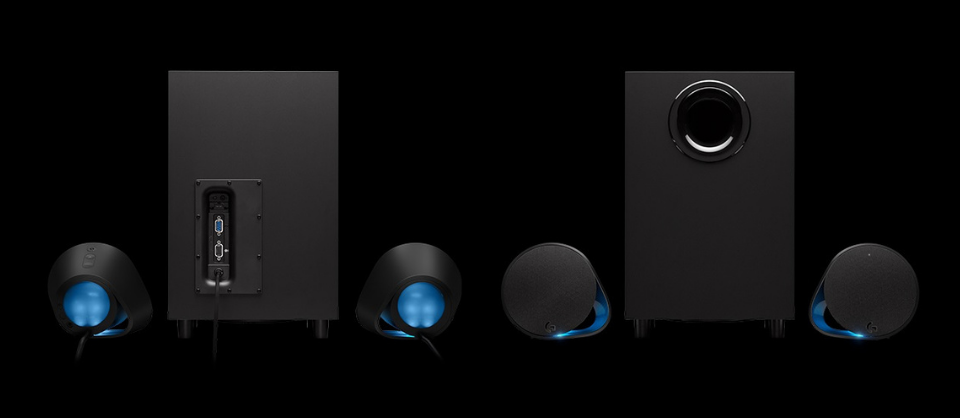
All the control buttons for both speakers are accessible on the right satellite speaker. For the Logitech Z623, the right satellite has the power button, main volume dial and bass volume dial. It also has an extra 3.5mm input as well as the 3.5mm headphone out. On the right satellite of the Logitech G560 are the G-key (more on that later), volume up and down, Bluetooth pairing, power button and the 3.5mm headphone out.
When it comes to inputs, the Logitech Z623 can have up to three connected devices since it has two 3.5mm inputs and a stereo RCA port. It is a strictly wired speaker so you can’t pair it with any Bluetooth device. On the other hand, the Logitech G560 has one USB input, one 3.5mm and you can also connect up to two audio sources via Bluetooth.
Features
The Logitech G560 is feature-packed, while the Logitech Z623 is pretty bare bones.

Since it is an older speaker set, the Logitech Z623 does not come with any features that you’ll see on newer 2.1 PC speakers, such as Bluetooth and RGB lighting. Back when it was released, those features were not very common, especially at the Logitech Z623’s price point. However, it does come with a THX-certification, which means that it has been tested, and passed, certain industry standards.
On the other hand, the Logitech G560 is feature-packed since it is a newer model. It has Bluetooth connectivity, it supports Logitech’s Lightsync RGB and it comes with DTS:X surround sound. Its integrated DTS:X surround sound is nice to have if you don’t mind a slightly muddied sound quality in exchange for simulated surround. We don’t really recommend that you use this feature at all.
However, the main selling point of the Logitech G560 is its RGB Lightsync feature. To get this feature going, you’ll need to connect the speaker via USB and you also need to download the Logitech G Hub software. You can sync lighting effects with other Logitech gaming devices and cycle through different effects such as pulse, breathing, static colors and more.
Another feature of the Logitech G560 is its ability to sync with colors in different areas of your screen. In the Logitech G Hub software, you can pick any part of the screen and assign it to the RGB lights on the speaker. The software will read the colors of the pixels on the screen and output the corresponding color on the RGB lights of the speaker, creating a nice lighting effect.
Sound Quality
The Logitech Z623 can get louder and has better sound quality.

When it comes to surround sound gaming, the Logitech G560 has a bit of an advantage since it has a simulated surround sound mode. However, as mentioned above, the sound quality does suffer a bit with this feature, so its up to you if you want to use it or not.
In stereo mode, they both sound good and they can get loud, especially the Logitech Z623 since it has a higher peak and continuous power rating. When gaming, the bass on both speakers are great. They can deliver rumbling lows which is great for action games that feature lots of explosions and gunfire.
When listening to music, the slightly boomy bass of the Logitech G560 can be a bit of a distraction. While it does not output the most defined low-end we’ve heard, the Logitech Z623 subwoofer definitely performs better than the Logitech G560 sub. When it comes to the mids and highs, the Logitech Z623 once again has a bit of an advantage as it outputs clearer and more detailed sound. If you read our Logitech Z623 vs Z506 comparison, you’ll notice that we really like the stereo sound quality of the Logitech Z623.
Verdict
If you just want a good pair of speakers without spending too much, the Logitech Z623 is the better option.
The Logitech Z623 is a great 2.1 speaker system at its price point. It doesn’t have any of the modern features that you’ll find on newer systems, but it performs on the one thing that it is designed to do, which is to output great sound. If you don’t really care for features such as Bluetooth connectivity, RGB lighting and so on, this is the speaker set to get.
On the other hand, if you care about aesthetics and wireless connectivity, the Logitech G560 should be your choice. Its sound quality is good and its Lightsync feature is very nice, especially if you are a fan of RGB lighting on your computer.
FAQs
For its price, the Logitech Z623 offers great value since it outputs very good sound.
No, you can only use it wired.
While it may be a bit expensive, it is worth it if you like RGB lighting on your PC workstation/battlestation.
Yes, you can connect Bluetooth audio sources to the Logitech G560.