

For productivity, the Logitech MX Master 3 is one of the best options around. It has more than enough programmable buttons, it supports gestures, it has multi-device and multi-OS support, and it also has a comfortable form factor with excellent durability. Logitech decided to upgrade this already excellent mouse and released the MX Master 3S. What exactly are the differences between these two, and if you already own the MX Master 3, should you upgrade to the 3S? Below is our Logitech MX Master 3S review and comparison against the MX Master 3.
Logitech MX Master 3 vs 3S Comparison Chart

Design
Both the Logitech MX Master 3 and 3S are ergonomic mice with very good durability.

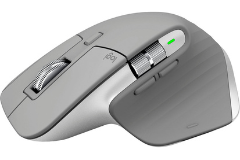
When it comes to design and build quality, there’s no real difference between the MX Master 3 and 3S. They use the same materials and they also share the same right-handed form factor with a large thumb rest. Both have an ergonomic design with rounded edges that feel good. They are also narrow, so they are easy to grip. In terms of ergonomics, these are very good. In fact, the Logitech MX Master 3 is our top pick for the best ergonomic mouse for productivity.
Build quality is pretty much the same. They feel durable and sturdy, and there’s no rattling whatsoever. The buttons feel nice, but the scroll wheels do wobble a bit. Overall, though, we didn’t really find anything to complain about regarding their durability.
One of the upgrades that you get with the MX Master 3S is its reduced noise click. It’s click noise is reduced by about 90%, which makes it less likely to disturb people close to your work area. That said, the MX Master 3 is not that loud to begin with, so this is just a minor upgrade.
The Logitech MX Master 3 is available in graphite and mid grey, while the MX Master 3S is available in graphite and pale grey.
Features and Connectivity
The Logitech MX Master 3 and 3S have similar features, but the latter has a more precise sensor.

Most of the features of both mice are accessible within the Logitech Options and Options+ (3S) software. Both software allow you to program buttons and adjust the sensitivity range. On that note, the sensitivity range of the MX Master 3 is 200 – 4000 dpi, whereas the MX Master 3S, with its upgraded sensor, features a sensitivity range of 200 – 8000 dpi. The latter has a wider range, so it’s more customizable to your preferred sensitivity.
The Logitech Options and Options+ are compatible with Windows and MacOS, which means that you’ll have access to all of their features on either OS. There’s no need to make an account to use either software, but it’s recommended to have one since both mice do not have on-board memory to save user created profiles. You can only save the settings on your account.
The Logitech MX Master 3 and Master 3S have the same number of programmable buttons, six to be exact. In addition to the standard buttons, they both have a thumb wheel, a MagSpeed wheel (free-scrolling) and a thumb rest with a button that enables gestures.
As for connectivity, the two mice support 2.4GHz wireless and Bluetooth connectivity. You can connect both of them to up three devices simultaneously, and switching can be done with the button located at their underside.
Performance
The Logitech MX Master 3S comes with an upgraded sensor.

Both mice come with the Darkfield sensor, but the one on the Logitech MX Master 3S is upgraded to have a wider sensitivity range. As mentioned earlier, the sensitivity range of the 3S is 200 – 8000 dpi, adjustable in 50 dpi increments. With its upgraded sensor, the MX Master 3S allows better customizability when it comes to your preferred sensitivity.
Apart from that, there’s no other notable difference between the two regarding their performance. They both have excellent tracking that allows you to use them even on glass surfaces, which is helpful if you are on the go and you don’t have access to a mouse pad.
Battery life is also similar. They are both equipped with a 500 mAh rechargeable Li-Po battery that can last up to 70 days on a single full charge. They can also be quick-charged for one minute for a use-time of three hours. Both come with USB-C charging cables
Verdict
If buying your first Logitech MX Master series mouse, go for the MX Master 3S, however, if you already have the MX Master 3, there’s no immediate need to upgrade.
Logitech MX Master 3

Logitech MX Master 3S

If you’re looking for a mouse for productivity and office work, there’s no better option than the Logitech MX Master series, specifically, the MX Master 3 and 3S. They have excellent ergonomics, they are durable, and they work on either MacOS or Windows. If you already have the Logitech MX Master 3, there’s no need to upgrade unless you need the 3S’ upgraded sensor and reduced noise clicks. If you are getting a new one, then the Logitech MX Master 3S is the better buy due to the aforementioned upgrades.
FAQs
The Logitech MX Master 3S and 2S share a lot of features, but the former is better built, has improved ergonomics and has an upgraded sensor.
You don’t need an account, but it’s recommended that you create one since the mouse does not have on-board memory. Your custom settings are account-bound.
Yes, it has excellent ergonomics, it’s durable and it has all the productivity features that you’ll need in a mouse.
There’s still audible noise when clicked, but it’s not very loud. The newer MX Master 3S improves on this by reducing click noise by 90%.