
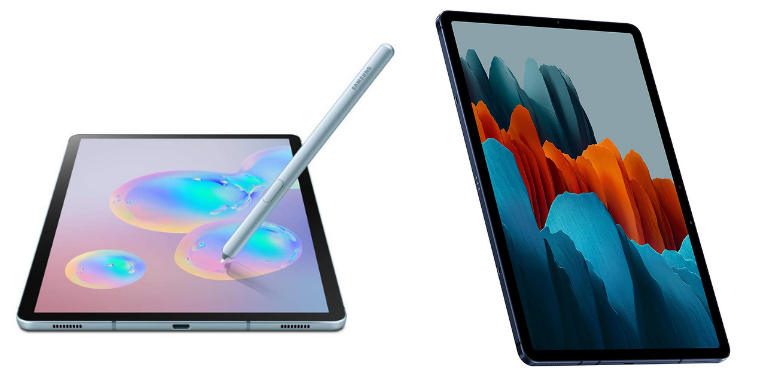
If you’re in the market for a new Android 2-in-1 tablet, the Samsung Galaxy Tab line should definitely be on your shortlist. They offer great performance, many useful features and beautiful displays. But which model should you buy? In this article, we compare the previous gen Galaxy Tab S6 and the current gen Galaxy Tab S7 to find out which one is right for you.
Galaxy Tab S6 vs S7 Comparison Chart
| Model | Galaxy Tab S6 | Galaxy Tab S7 |
| Amazon product | Amazon product | |
| Price | Amazon product | Amazon product |
| Display | Super AMOLED 10.5 inches 1600 x 2560 | LTPS TFT 11 inches 1600 x 2560 120Hz HDR10+ |
| Chipset | Qualcomm SM8150 Snapdragon 855 | Qualcomm SM8250 Snapdragon 865+ |
| Configurations | 128GB 6GB RAM 256GB 8GB RAM | 128GB 6GB RAM 256GB 8GB RAM 512GB 8GB RAM |
| Storage | Dedicated microSD slot Up to 1TB | Dedicated microSD slot Up to 1TB |
| Front Camera | 8MP 1080p/30fps | 8MP 1080p/30fps |
| Rear Camera | 13 MP (wide) 5 MP (ultrawide) HDR Panorama 4K/30fps | 13 MP (wide) 5 MP (ultrawide) HDR Panorama 4K/30fps |
| Connectivity | Wi-Fi 802.11 a/b/g/n/ac LTE Bluetooth 5.0 | Wi-Fi 802.11 a/b/g/n/ac/6 LTE Bluetooth 5.0 |
| Battery | Li-Po 7040 mAh | Li-Po 8000 mAh |
| Dimensions | 9.63 x 6.28 x 0.22 inches | 9.99 x 6.51 x 0.25 inches |
| Weight | 420g | 498g |
Design and Display
The Galaxy Tab S6 has the superior Super AMOLED display but the 120Hz refresh rate and HDR10+ support makes up for the LTPS TFT panel of the Galaxy Tab S7.

When it comes to their overall design, the Galaxy Tab S6 and S7 are very similar. Their dimensions are pretty close, with the Galaxy Tab S6 measuring 9.63 x 6.28 x 0.22 inches and the Galaxy Tab S7 at 9.99 x 6.51 x 0.25 inches. The Galaxy Tab S7 is a bit larger, but ultimately, the difference in size is negligible. As for their weight, the Galaxy Tab S6 is more lightweight, weighing only 420 grams to the 498 grams of the Galaxy Tab S7.
The Galaxy Tab S6 has a 10.5-inch Super AMOLED display with a resolution of 2560 x 1600. In contrast, the Galaxy Tab S7 sports an 11-inch LTPS TFT screen, also with a resolution of 2560 x 1600. While going from a Super AMOLED to an LTPS TFT can be considered a downgrade, the Galaxy Tab S7 does have HDR10+ support, as well as a 120Hz refresh rate. The image quality on the Galaxy Tab S6 is definitely better, but the increased size and 120Hz refresh rate of the Galaxy Tab S7 are also nice to have.
Both tablets are lightweight, slim and easy to handle. They both have a glass front, an aluminum back and an aluminum frame, so they both feel premium to the touch.
At the back, they are also very similar. The camera housing for their twin cameras are nearly identical. Also, they both have a long indentation for holding the included S Pen. When you lay the tablet on its back, with the S Pen stored, one side is raised, since the S Pen is not flush with the device. A minor annoyance, but still worth mentioning.
Performance
The Galaxy Tab S7’s newer Snapdragon 865+ chip offers significant performance improvements over the Galaxy Tab S6’s Snapdragon 855 chip.

Equipped with the newer Snapdragon 865+ chipset, the Galaxy Tab S7 is noticeably faster and snappier than the Galaxy Tab S6. However, that doesn’t mean that the Galaxy Tab S6 will suddenly perform terribly. It still has more than enough processing power and speed for any app or software that you use on a daily basis. But when compared to the Galaxy Tab S7, it is a bit slower.
The included S Pen with the Galaxy Tab S7 is an improved version of the one included with the Galaxy Tab S6. It has a lower latency of only 9ms. While it is definitely an improvement, in real-world application, the difference is barely noticeable.
If you also play games, then the 120Hz panel of the Galaxy Tab S7 will definitely give you a better experience, provided that the games you play are capable of framerates higher than 60fps. With a 120Hz panel, your games will be smoother. Non-gamers will also have a better overall experience with a 120Hz panel than a 60Hz panel since every action that you make is smoother, such as scrolling, moving windows and more.
Both the Galaxy Tab S6 and S7 come with Samsung DeX, Samsung’s interface that emulates a desktop experience. With it, you’ll be able to have several multi-tasking functions available, such as split screen view, multi-windows and more. If you are using your tablet for productivity, Samsung DeX is an invaluable tool to have.
Camera
When it comes to their camera, there’s not much difference between the Galaxy Tab S6 and S7.

Both tablets feature 8MP front cameras that are also capable of 1080p/30fps recording. Specs-wise, they are exactly the same, no difference whatsoever. They produce excellent selfies and they are more than enough for video calls.
The Galaxy Tab S6 and S7 also have the same configuration when it comes to their rear twin cameras. They both have 13MP wide and 5MP ultrawide cameras that are also capable of recording 4K videos at 30fps. Since they are HDR enabled, the bright and dark areas of your photos are enhanced in order to show greater detail.
If your main reason for buying a Samsung tablet is for its camera, then you can choose either the Galaxy Tab S6 or S7 since they have the same configuration.
Click here to see how the Galaxy Tab S6 fares against the Apple iPad Pro
Battery and Storage
The Galaxy Tab S7 comes with a higher capacity 8000 mAh Li-Po battery.

There are two configurations for the Galaxy Tab S6—128GB 6GB RAM and 256GB 8GB RAM. On the other hand, the Galaxy Tab S7 has three configurations available—128GB 6GB RAM, 256GB 8GB RAM and 512GB 8GB RAM. Missing from the Galaxy Tab S6 lineup is a 512GB variant, so if you need a tablet that has a bigger capacity internal storage, you have to go with the Galaxy Tab S7. Both tablets have a dedicated slot for a micro SDXC card up to 1TB.
The Samsung Galaxy Tab S7 sports a Li-po 8000 mAh battery, which is an upgrade over the 7040 mAh battery of the Galaxy Tab S6. Although the Galaxy Tab S7 has a higher capacity battery, it doesn’t really have a significant improvement over the Galaxy Tab S6 when it comes to battery life. Both tablets are capable of 15 hours of continuous video playback. One reason why there is no significant battery life improvement is the 120Hz display of the Galaxy Tab S7.
When it comes to charging, the Galaxy Tab S7 offers faster 45w charging speed. In comparison, the Galaxy S6 is only capable of 15w charging, so there is a significant improvement there.
Verdict
The Galaxy Tab S7 comes with some nice upgrades over the Galaxy Tab S6.
There are many features that make the Galaxy Tab S7 a good purchase. With its 120Hz screen, fast charging speed and upgraded Snapdragon 865+ chipset, you’ll have a powerful device that will serve you for a long time. That said, if you already have a Galaxy Tab S6 and you’re thinking of upgrading, you’ll be better off holding onto your current device as it is still an excellent performer. However, if you are upgrading from a very old tablet or if you are shopping for your first, you should go with the Galaxy Tab S7.
FAQs
The Galaxy Tab S7 is the better tablet overall. Although it did get a downgraded screen panel, it still comes with features that more than make up for that, such as a 120Hz refresh rate, HDR10+ support, better chipset, improved S Pen and more.
Yes, it is still an excellent tablet. It offers very good performance and a nice looking display.
No, but the difference in size not that big. The Galaxy Tab S6 comes with a 10.5-inch screen, while the Galaxy Tab S7 has an 11-inch screen.
Yes, the Samsung Galaxy Tab S7 is one of the first tablets to have 5G in the US.