

Smart TVs with an integrated webcam are something of a rarity since they never really made it into the mainstream. The next best thing is to use them as a secondary display of a PC or laptop, plug a webcam into the device and call it a day. However, there are a few webcams that can connect straight to your smart TV.
First off, there’s the Facebook Portal TV. It’s one of the best options around because of how easy it is to set up. There’s also the Logitech C920 that’s considered as among the best overall performers, and then there’s the Logitech BRIO for a feature-packed experience, which could come in handy for other purposes. Last but not least is the Septekon Streaming Camera for a simple plug-and-play solution.
Best Webcam for Smart TV Comparison Chart
| Model | Facebook Portal TV | Logitech C920 | Logitech BRIO | Septekon Streaming Camera |
| Amazon product | 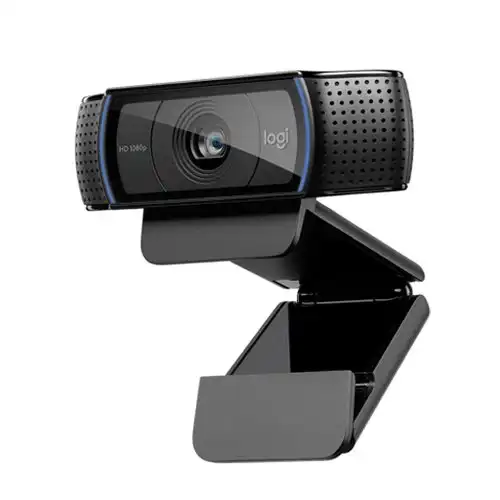 | Amazon product | Amazon product | |
| Price | Amazon product | Amazon product | Amazon product | |
| Resolution | 720p | 1080p at 30 fps | 4K at 30 fps, 1080p at 60 or 30 fps, 720p at 90, 60 or 30 fps | 1080p at 30 fps |
| Field of View | 125 degrees | 78 degrees | 90, 78 or 65 degrees | n/a |
| Microphone | 8-mic array | Stereo | Dual omnidirectional | Stereo |
| Privacy | Buttons to disable mic and camera, sliding camera cover | n/a | Camera cover | n/a |
Facebook Portal TV
Best way to add a webcam to your smart TV, if privacy doesn’t concern you that much.

Besides the device itself, all you need to start using the Facebook Portal TV are a Facebook or WhatsApp account, an internet connection, an HDMI cable, which isn’t included in the box, and, of course, a TV. After signing into your account, you can make video calls via Messenger and WhatsApp just like that. One downside worth noting here is it doesn’t support Zoom, so you’re out of luck if that’s your app of choice.
At any rate, it has Netflix support so you can stream your favorite TV shows and movies on it, and it’s even got Amazon Alexa baked into it for voice commands, adding a touch of convenience. What’s more, you have the option to mount it on top of your TV or place it on your TV stand, whichever floats your boat.
The Facebook Portal TV won’t win any awards in the resolution department, though. Its camera can only go up to 720p, but if nothing else, it’s a smart camera that uses AI to automatically pan and zoom to make sure everyone’s in the frame during video calls.
Now Facebook and privacy don’t exactly go hand in hand, but the company did add a couple of features to put its users’ minds at ease. For starters, the Facebook Portal TV’s microphone and camera can be disabled at the touch of a button. There’s also a sliding camera cover, for good measure.
Logitech C920
Excellent overall webcam.

In terms of price-performance ratio, the Logitech C920 is hard to beat, providing a lot of value for money. As a webcam for your desktop, it’s a solid all-around performer, and it’s decent enough for your smart TV. It can record in 1080p at 30 fps with a 78-degree field of view and autofocus, as well as stereo mic.
Thing is, there are a few requirements and restrictions to take note of. Now by “smart TV,” we mean an Android TV. That said, you’re not left with many options here, and you’ll probably be stuck with Google Duo. According to Google, you’ll need a smart TV running Android 8.0 or later for Duo, and if you meet all the requirements, all you have to do is plug the webcam into the USB port and that’s it.
Sure, Duo isn’t the most popular, especially when there are more widely used video-calling apps such as Skype and Zoom out there. But hey, at least the Logitech C920 coupled with Duo makes for a plug-and-play setup on your smart TV.
Logitech BRIO
If 4K is your thing.

Disregarding its price tag, the Logitech BRIO is easy to recommend. The company really went all out on its features, including recording in 4K at 30 fps or 1080p at 60 fps, multiple fields of view (90, 78, or 65 degrees), 5x HD zoom and autofocus.
Moreover, it has RightLight 3 with HDR, so you’ll be seen clearly even in low-light conditions. It also has dual omnidirectional microphones with noise-canceling technology, picking up your voice with clarity while minimizing unwanted noise.
However, it’s the same story as the Logitech C920 when it comes to connecting it to your smart TV. To reiterate, you’ll need a smart TV with at least Android 8.0 and make do with Google Duo. You’ll be better off plugging the BRIO into a computer and using the TV as a secondary display to take advantage of its features like Windows Hello support.
Septekon Streaming Camera
Plug it in and you’re done.

The Septekon Streaming Camera may be something of an outlier on this list, as it’s not exactly from a popular brand like Facebook and Logitech. But don’t let that stop you from giving it a shot.
Performance-wise, it’s A-OK, capable of recording in 1080p at 30 fps. On top of that, it can rotate 360 degrees horizontally and tilt up to 30 degrees vertically. That way you’d always find the perfect angle for your video calls. The best part is, it’s plug and play, meaning you can just stick it into any smart TV and you’re all set.
Verdict
Facebook issues aside, the Portal TV is a solid webcam for video calling on TV.
Webcams that connect directly to smart TVs without a hitch are far and few between. In other words, setup isn’t that straightforward for the most part because of support and compatibility issues. For that reason, the Facebook Portal TV is arguably the best here because of how painless it is to install, but for those concerned about their privacy, it’s a hard sell. The Logitech C920 and BRIO are serviceable, but the technology just doesn’t quite feel like it’s there yet. The same goes for the Septekon Streaming Camera, but at the very least, you can just plug it in and start using it.
Again, you can technically use any webcam with any smart TV—even “dumb” TVs, in fact—and use any video-calling app you want. It may not be as simple as plug-and-play solutions, but connecting your laptop or PC with a webcam plugged in to your TV and using it as a secondary display will work wonders.
FAQs
Yes, there are options such as the Facebook Portal TV that can connect directly to your smart TV for video calls.
Yes, but you’ll need to use your TV as a secondary display of your computer or mirror a device that supports Zoom on it.
In most cases, yes, 720p is pretty clear for everyday video calls.
There are some models that have integrated cameras such as the Samsung F8000, but they aren’t very common.